A little more life around your MacBook notch.

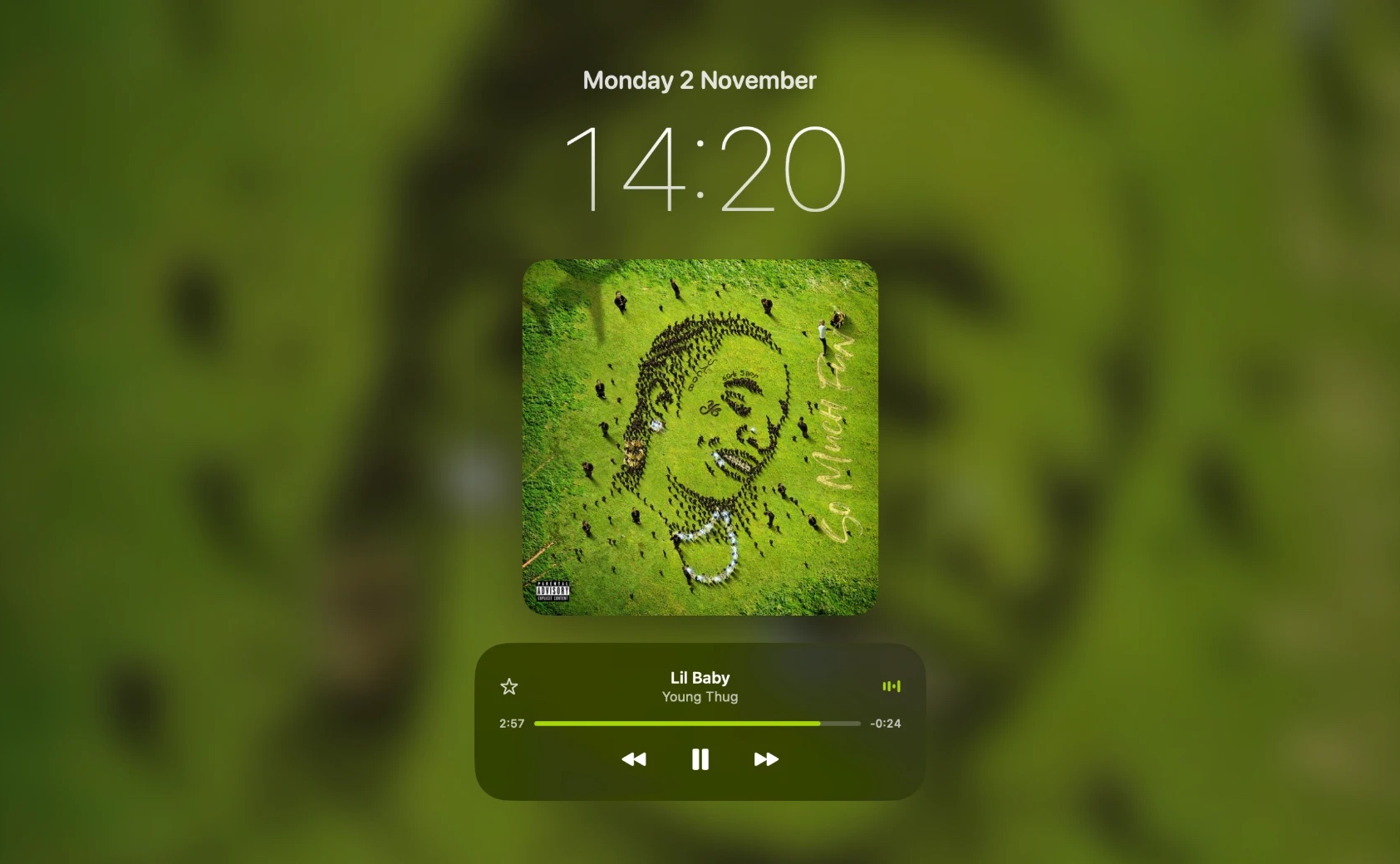
Your album art on your Mac’s lock screen.

Ledge turns the notch into a Dynamic Island-style music player. Hover to open it, and see your music carried through to the lock screen.

Free forever · Pro includes a 48-hour free trial · macOS 14 or later

Hover over the notch. That’s it.

Lock screen

The song stays with you, even when the Mac is locked.

Step away and your album art is still there, front and centre, with playback controls under it. Ledge makes the lock screen feel like part of what you’re listening to.

  • Album artwork on the Mac lock screen
  • Play, pause and skip without unlocking
  • A full-screen Now Playing display when your Mac is idle
Everything around the notch

Small space. Plenty of life.

Ledge turns dead pixels into the most useful part of your menu bar.

A compact player, on hover

Move your pointer to the notch and it opens into a refined player: album artwork, track title and artist, and playback controls. Move away and it disappears.

Shuffle & repeat

Control how your music plays without opening the app.

Full-screen Now Playing

Leave your Mac idle and your song takes over the screen: big artwork, the title, and a slowly drifting clock. Move the mouse and it fades away.

AirPods battery

Monitor battery levels and get notified when it matters.

Volume notifications

Elegant on-notch feedback as you change the volume.

Sound output switching

Jump between speakers, headphones and AirPods in a click.

Make it yours

Pick your lock screen clock style, blur and dim the artwork, choose the equaliser colour, and set how quickly the notch opens.

Small and quiet

Light on your Mac.

Ledge is a small, native Mac app that sits quietly at the top of your screen until you need it.

< 5 MB

A tiny download

Built natively for macOS. No Electron, no bundled browser, no bloat.

< 1%

Barely any CPU

Typically a fraction of a percent of one core while music plays, and well under 50 MB of memory.

0

Accounts or trackers

No sign-up, no analytics, no ads. Your listening stays on your Mac.

On cue

Only works when you play

Ledge listens for Spotify and Apple Music’s own play and pause signals instead of constantly checking.

CPU and memory measured on a MacBook with the notch closed and music playing. Results vary with your Mac and what else is running.

Pricing

Free to start. Pay once to go further.

No subscription. Ever.

Ledge

Free forever
Everything you need for music at the notch.
  • Notch music player
  • Track information
  • Play, pause and skip
  • Shuffle and repeat
Download free
48-hour free trial

Ledge Pro

£4.99 one-off
No subscription. Yours to keep.
  • Everything in Free
  • Album artwork on the lock screen
  • Full-screen Now Playing
  • AirPods battery monitoring & notifications
  • Volume notifications
  • Sound output switching
  • Visual customisation
Buy Ledge Pro
Questions

Frequently asked questions.

Which Macs does Ledge work on?
Any Mac running macOS 14 or later. It’s designed around the notch on MacBook Pro and MacBook Air. On a Mac without a notch, Ledge shows a similar island at the top centre of the screen.
Which music apps does it work with?
Spotify and Apple Music. Ledge shows what’s playing and controls playback in either one.
What’s free, and what’s Ledge Pro?
The free version has the notch music player, track information, play, pause and skip, and shuffle and repeat, forever. Ledge Pro adds album artwork on the lock screen, the full-screen Now Playing view, AirPods battery monitoring and notifications, volume notifications, sound output switching and visual customisation. It’s a one-off £4.99 payment, with no subscription.
How does the free trial work?
Your 48-hour Ledge Pro trial starts the first time you open Ledge. You don’t need to enter any payment details. When it ends, you keep the free features, and you can unlock Pro whenever you like.
Can I use my licence on more than one Mac?
Yes. One licence works on up to two of your own Macs.
Why does macOS warn me when I first open Ledge?
Ledge is an independent app and isn’t notarised by Apple yet, so macOS may block it the first time. Open System Settings → Privacy & Security, scroll down, and click Open Anyway. You only need to do this once for each version you install.
What permissions does Ledge ask for?
Ledge asks to control Spotify and Music, so it can read what’s playing and send play, pause and skip. If you use AirPods battery features, it also asks for Bluetooth access. You can change both in System Settings → Privacy & Security.
Does Ledge collect any data?
No. There are no accounts, analytics or trackers. Ledge only goes online to check your Pro licence, and, if you choose to connect Spotify, to like songs and fetch artwork.
How do I update Ledge?
Download the latest version from this page, quit Ledge, and drag the new one into your Applications folder. Your settings and licence are kept.
Will the lock screen feature keep working after macOS updates?
The lock screen artwork uses undocumented parts of macOS, so a macOS update can occasionally affect it. The rest of Ledge uses standard macOS features. If an update breaks something, Ledge will be updated to fix it.
I need help, or found a bug.
Email [email protected] and we’ll get back to you.
Ledge app icon

Bring life to your notch.

Download Ledge, try Pro free for 48 hours, and decide later.

Requires macOS 14 or later · MacBook with a notch recommended

Opening Ledge for the first time. Ledge is an independent app and isn’t notarised by Apple yet, so macOS may block it on first launch. If so, go to System Settings → Privacy & Security, scroll down, and click Open Anyway. You only need to do this once.